Garden Planner for Canva KDP: Create & Sell Effortlessly
Creating a low-content book for Amazon KDP requires attention to detail, especially when it comes to the interior layout. For publishers targeting the home and gardening niche, the Garden Planner for Canva KDP offers a structured, professional, and highly practical solution. This article explores the components of this specific interior template, its practical benefits, and how it serves both the end-user and the publisher.
More Than Just Pages: A Comprehensive Gardening System
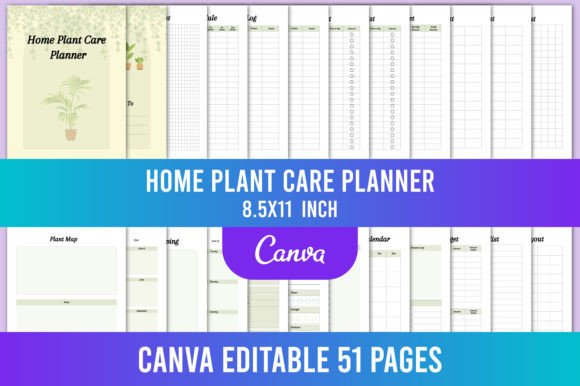
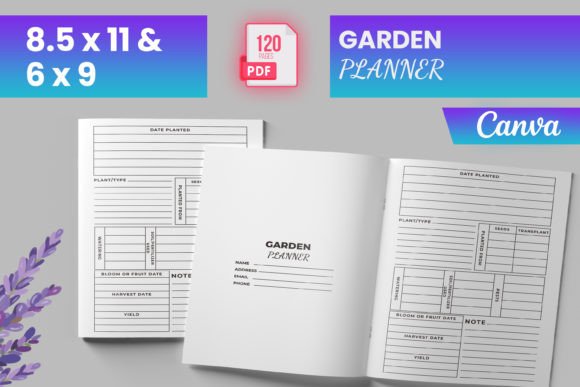
This template provides a complete, ready-to-upload PDF file alongside editable Canva source files. With 120 total pages, including an intro page and a “Belongs To” page, it balances depth with usability. The inclusion of 6x9 and 8.5x11 inch format options means you can target different customer preferences—the smaller size is more portable, while the larger size offers generous writing space for detailed logs. Files were tested on Amazon KDP to ensure quality, which reduces the guesswork typical in interior formatting. The bleed-ready specification means your printed layouts will look clean and professional without critical content being cut off.
The editable Canva files, along with the included PNG and JPG files, give you flexibility for both customization and marketing. You can quickly adjust colors, fonts, or page elements to match your brand identity. The “instant download” aspect means you can start customizing immediately, whether you plan to use the design as-is or make significant changes.
Practical Benefits for the End-User: Solving Real Gardening Problems
A garden planner is only effective if it addresses how people actually manage their plants. This interior template includes specific sections that solve common gardening challenges.
Tracking and Consistency
Many gardeners struggle with consistency. A dedicated watering schedule helps prevent the common problem of over or under-watering, especially during hot months. The seed starting log allows gardeners to track germination rates, dates, and conditions, which improves planning for the next season. Monthly to-do lists and seasonal checklists ensure that critical tasks like pruning, fertilizing, and mulching are not forgotten. By providing these dedicated tracking pages, the planner becomes a daily tool rather than a passive notebook.
Financial Management
Gardening can be surprisingly costly between soil amendments, seeds, tools, and water. The expense log and produce budget sections help gardeners track their actual costs against the value of their harvest. This data allows them to make informed decisions about which crops to prioritize and whether to invest in raised beds, irrigation, or organic fertilizers. For hobbyists turning their garden into a small business, these financial pages are essential for profitability analysis.
Strategic Planning for Healthier Gardens
Crop rotation is fundamental to soil health and disease prevention, yet it is easy to lose track year after year. The dedicated crop rotation log makes it straightforward to map out planting areas and avoid repeating crops in the same bed. The garden layout pages, combined with the monthly harvest calendar, encourage forward-thinking. Visualizing where each crop will go and when it will be ready helps with succession planting and efficient use of space.
The 4-page plant card is a standout feature. It allows gardeners to create in-depth profiles for their most important plants—tracking everything from germination rates and transplant dates to final yield and pest resistance. For growers who experiment with new varieties or practice seed saving, this level of detail is invaluable.
Proactive Pest and Disease Management
A reactive approach to pest control often results in crop loss. The pest disease log and pest control pages help the gardener identify issues early, record the effectiveness of treatments, and plan preventive measures for the following season. Tracking which pests appear at which time of year makes it easier to implement targeted controls, such as row covers or beneficial insects, before an infestation takes hold.
Why This Matters for KDP Publishers
For creators and entrepreneurs building a KDP business, choosing the right interior template is a critical step. The Garden Planner for Canva KDP is designed to meet Amazon’s formatting requirements, which reduces the risk of upload errors and rejections. The inclusion of both 6x9 and 8.5x11 trim sizes covers two popular and profitable categories on the platform.
The editable Canva files provide a significant advantage. Trends and customer preferences change. Being able to adjust fonts, colors, or swap out a page layout means the publisher can keep their product feeling fresh without starting from scratch. You can add your own branding elements to the intro page or “Belongs To” page. Consider updating the cover to match a specific aesthetic, such as rustic, minimalist, or vibrant botanical themes. Because the files were tested on KDP, you reduce the guesswork involved in setting up margins and bleed, which saves hours of trial and error.
The niche itself is strong. Gardening has a dedicated, passionate audience that consistently seeks tools to improve their practice. A well-designed planner meets a genuine need for organization, which leads to better reviews and repeat customers.
Who Should Consider This Template?
This interior is suited for several groups:
- KDP publishers targeting the home, hobby, and gardening categories. The comprehensive logs provide a high perceived value that justifies a competitive price point.
- Bloggers and educators looking for a lead magnet or supplementary material for their audience. The editable files allow you to customize the planner to your brand or course curriculum.
- Hobbyists or freelancers who want a beautifully organized personal gardening journal without paying for expensive custom design work.
- Small business owners offering garden coaching or landscape design services who need a professional tool to give to clients.
The specialized nature of this planner means it appeals to a specific audience, but that audience is actively searching for better ways to organize their gardening efforts. The 120-page count provides substantial content without overwhelming either the publisher or the end-user.
Considerations Before You Publish
While this interior template provides a strong foundation, a successful KDP product also requires attention to cover design and product description. A generic cover will not convert as well as one that matches the tone of the interior. Consider creating a cover that reflects the layout style and color palette you use in the editable files.
This is a niche product. If your overall strategy is to sell general lifestyle planners, a specialized gardening journal may not fit your catalog. However, if you are looking to diversify into a high-interest specific category with less competition than general journals, this is an excellent choice.
The 6x9 and 8.5x11 trim sizes are standard and favored by customers for journals and planners. The bleed-ready format ensures that the design extends to the edge of the page, giving a polished, professionally printed look. You will still need to upload the correct file variation to KDP based on the trim size you select.
Basic proficiency in Canva is helpful for making full use of the editable files, but the platform is intuitive and widely used. The included PDF is ready to upload immediately if you prefer a no-edits approach.
Making the Most of the Digital Assets
The true power of the Garden Planner for Canva KDP lies in its editability and the supporting files. The PNG and JPG files are useful for creating promotional graphics, Amazon A+ content, or social media posts. You can showcase the interior pages to help customers understand the value they are getting, which often improves conversion rates.
Consider updating the cover design seasonally or creating variations that target specific subgroups—such as vegetable gardeners, flower growers, or homesteaders. The 4-page plant card can be highlighted in your product description as a differentiator from simpler planners on the market. By emphasizing the specific sections like the seed inventory, monthly harvest calendar, and crop rotation logs, you speak directly to the needs of serious gardeners.
For publishers looking to build a series, this template provides a scalable framework. Once you are comfortable with the Canva file structure, you can create related products such as a meal planner, a homestead journal, or a seasonal task log that shares the same design language.
A successful KDP product delivers consistent value. The Garden Planner for Canva KDP provides a reliable framework for creating a highly useful garden journal. For the publisher, it reduces technical headaches and speeds up time to market. For the end-user, it offers a complete system for managing their garden from seed to harvest. By focusing on real-world utility and professional presentation, this template helps turn a simple idea into a practical tool that customers will find genuinely helpful for years to come.